How Technology Is Making Business Documents Easier to Search and Manage

 6 Oct 2026
 Reading Time : 5 Minutes
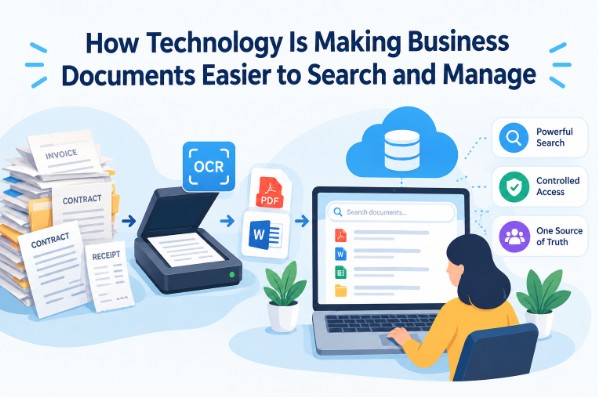
Technology is transforming business document management by making paper records easier to digitize and digital files easier to search and organize. OCR tools convert scanned documents into searchable text, while knowledge base systems provide centralized storage, powerful search, controlled access, and a single source of truth for important business information.
Documents are a core part of various business procedures. Despite digital technologies, paper documents have remained relevant. You will find that contracts, receipts, invoices, and other such documents are almost always in paper format rather than digital.
Storing and organizing them can be quite a hassle because they tend to pile up really fast. In just a few months, most businesses collect a hefty pile.
However, even if you disregard that and just think about the sheer number of digital documents, managing them becomes a nightmare.
Then comes the fun part: finding one old document when you need it. You may know that it exists, but where is it? Is it in an email? On an office computer? In a folder on the cloud? Or sitting in a filing cabinet somewhere?
Thankfully, with technology, these problems have been trivialized. Today, we will see how different tools and technology are making document storage and management easier.
OCR Tools for Digitization
Why Digitize Documents?
Paper documents may be relevant, but they still have problems.
For example:
-
They are bulky and difficult to store
-
They require weather-protected storage measures to prevent water damage
-
They are hard to organize and take too much time to search through
The easiest solution for these problems is to digitize them.
Digital files are easier to store. A business can store many files on a single computer or cloud service.
Furthermore, digital files are easier to manage. They can be put into their own folders and sorted by name, date, customer, or type. This makes it very easy to search for them, and that saves time when someone needs an old record.
For example, an accountant may need to check a bill from several months ago. With paper files, they may have to look through several folders. With digital files, they can search for it in a few clicks.
How OCR Tools Help With Digitization
So, how do you digitize paper documents? The easiest way is to use a scanner. But scanned documents are just images. They are not real digital documents. You cannot annotate them, search them for specific keywords, or even edit them.
That’s where OCR comes in. Nowadays, you can go online and simply search for terms like image to text converter or OCR online to find free tools that can extract text from images.
A business can use an image to text converter to easily digitize scanned documents and store them as bona fide PDFs or Word files.
Knowledge Base Management Software
Digitized documents are fine and dandy, but they are of little use if they are stored on a single computer or hidden behind an inconvenient cloud interface.
The obvious problem here is that:
-
Only the person who can physically access the computer can get the files. This is problematic if multiple people need access to the same file. i.e., accounts may need an invoice, while the sales team has it, but they can’t share it as easily. You get the point.
-
Or, in the case of poor interfaces, people who need access to the files have trouble finding or navigating to them.
So what’s the solution? The solution is to use a knowledge base management system.
A knowledge base (KB) is a centralized, accessible repository of information that anybody in a business organization can access. Here’s how they solve the above-mentioned problems.
KBs Have Extremely Powerful Search Capabilities
Any knowledge base worth its salt has extremely powerful search abilities that dwarf those of an operating system.
Most KBs provide the following features that make searching for documents a breeze.
-
Fast Results: Search results appear quickly, so users can find the information they need without waiting.
-
Accurate Search: The system returns results that closely match the user's query and intent.
-
Semantic Understanding: It understands the meaning behind a query, even when the user's wording does not exactly match the content.
-
Typo Tolerance: Small spelling mistakes do not stop users from finding useful results.
-
Smart Filtering: Filters let users narrow results by topic, category, date, document type, or other useful factors.
-
Relevant Result Ranking: The most useful and relevant results appear at the top instead of making users search through a long list.
-
Natural-Language Queries: Users can search using normal questions and phrases rather than having to enter exact keywords.
So, you can see how knowledge bases trivialize searching. Any document that is in the KB can be found within a few seconds. So, no more hunting through emails and fragmented data silos is required.
Centralized Yet Controlled Access
A good knowledge base also provides easy access to all members of the organization. However, not all data needs to be available to everyone.
For example,
-
Any sensitive employee-related data should only be handled by HR.
-
The sales data should only be handled by the marketing and accounting teams.
-
Salary slips should only be handled by HR and accounting.
-
Product data should only be available to the development and marketing teams.
You get the idea.
Knowledge bases can easily control who gets access to which data by using roles. Each person who uses the KB gets assigned a role, and they can only access data available to that role. This way, information can be compartmentalized easily.
A Single Source of Truth for Business Documents
A knowledge base gives a business one central place to store and manage its important documents. Instead of keeping information spread across emails, shared drives, chats, and personal files, teams can work from the same up-to-date source.
This helps reduce conflicting versions of documents and makes it easier for employees to find the information they need. It also keeps company knowledge organized, so important information is less likely to get lost when people change roles or leave the business.
Conclusion
Technology has made business document management faster, simpler, and more reliable. OCR tools can turn paper records into searchable files, while knowledge bases keep digital documents organized and accessible. Together, these tools save time, reduce clutter, and help businesses find and manage important information with less effort.